Transformers: More than Meets the Eye
Outline
-
Systematic Model Selection
- Preparation and Setup
- Data Partitioning
- Model Evaluation
- Performance Aggregation
- Model Selection
- Final Model Training and Validation
- Documentation and Transparency
-
A Brief History of Transformers
- Transformers and Attention
- Transformer Architecture
- Attention Mechanism
- Live Demo: DIY GPT (nanoGPT)
-
Latent Space and Embeddings
- Understanding Latent Space
- Role in Autoencoders
- Generative Model Applications
- Embeddings in Practice
-
LLMs and General-Purpose Models
- Fine-Tuning
- Prompt Engineering
- One-Shot and Few-Shot Learning
- Structured Responses
-
LLM API Integration
- API Access Patterns
- Common LLM API Providers
- Function Calling
- Error Handling and Best Practices
-
Building a Complete LLM Chat Application
- Basic Chat Interface
- Command Line Interface
- Architecture Benefits
- Addressing Hallucination
-
Resources and Links
- Papers and Documentation
- Open Source LLMs
- Healthcare AI Applications
- Interactive Platforms
Systematic model selection
- Preparation and Setup
- Parameter Definition: Establish the number of splits or folds (K) for the validation process, decide on the repetitions for techniques like Repeated K-Fold or K-Split if needed, and outline the hyperparameter grid (C) for each candidate model. For models lacking hyperparameters, set C to an empty configuration.
- Data Partitioning
- Validation Holdout (Optional): Optionally reserve a subset of the data as a standalone validation set (V) to provide an unbiased final evaluation.
- Model Evaluation
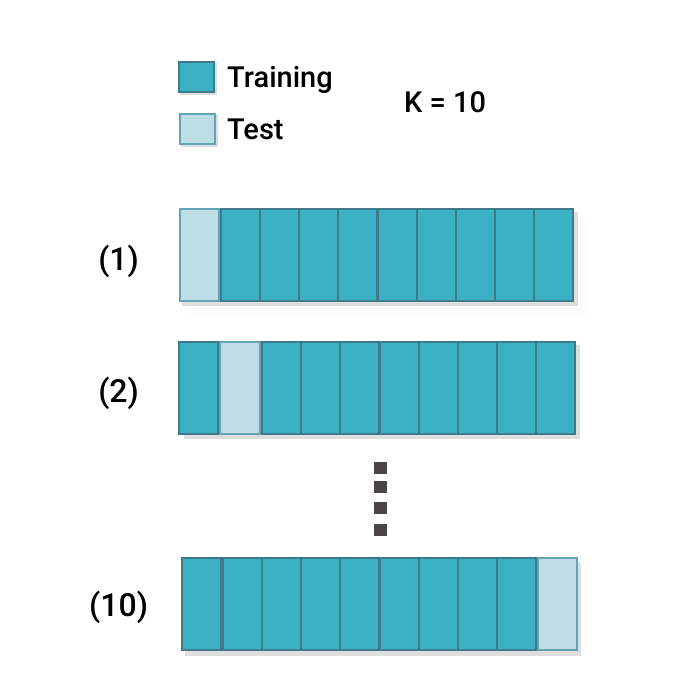
- K Splits/Folds Validation (Outer Loop): Organize the data into K distinct splits or folds, using a consistent strategy to ensure each segment of data is used for validation once. This could involve stratified sampling to preserve class distributions in cases of imbalanced datasets.
- Hyperparameter Optimization (Inner Loop): Within each split or fold, perform hyperparameter tuning for models with configurable parameters. This can include nested validation within the training portion of each split or fold to determine the optimal settings.
- K Splits/Folds Validation (Outer Loop): Organize the data into K distinct splits or folds, using a consistent strategy to ensure each segment of data is used for validation once. This could involve stratified sampling to preserve class distributions in cases of imbalanced datasets.
- Performance Aggregation
- Score Compilation: Collect and average the performance scores across all K splits or folds to derive a comprehensive performance metric for each model configuration.
- Model Selection
- Optimal Model Identification: Evaluate the aggregated performance of each model to select the one that demonstrates the best balance of accuracy, precision, recall, F1 score, or other relevant metrics, considering the specific objectives and constraints of the study.
- Final Model Training and Validation
- Comprehensive Training: Use the entire dataset (excluding any validation holdout) to train the selected model with the identified optimal hyperparameters.
- External Validation (Optional): If a separate validation set was reserved or an external dataset is available, assess the finalized model against this data to gauge its performance and generalizability.
- Documentation and Transparency
- In-depth Reporting: Thoroughly document the selection process, including the rationale behind the choice of metrics, models, hyperparameters, and the comparative performance across different model configurations, to ensure clarity and reproducibility.
Additional Considerations
- Class Imbalances: If applicable, ensure strategies to handle class imbalances (e.g., stratified sampling, class weights) are integrated into both the training and validation processes.
- Computational Efficiency: Be mindful of the computational complexity, particularly with a large number of models, hyperparameters, and folds. Employ efficient search techniques and parallel processing where feasible.
- Domain Requirements: Customize the model selection framework to align with the domain-specific needs and the nature of the data, ensuring the chosen approach is both relevant and practical.
Simple k-fold
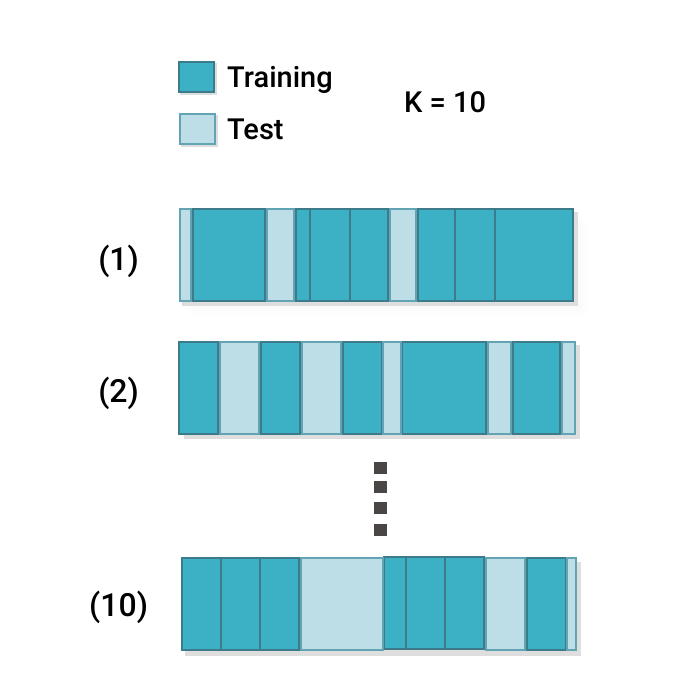
Random k-fold
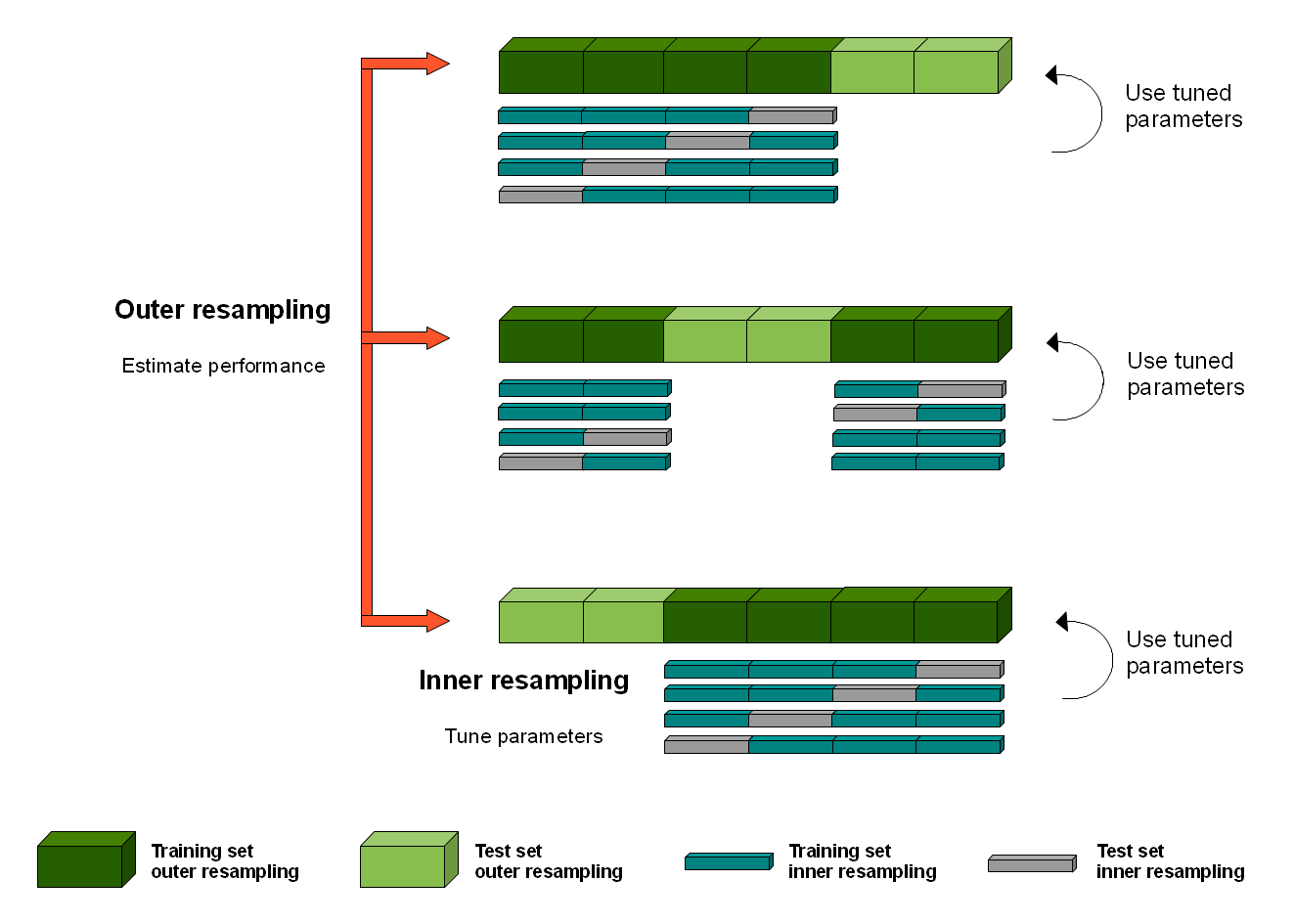
Nested k-fold
Live Demo
Training splits for systematic model comparison
A Brief History of Transformers
Transformers and Attention
Transformers have redefined the landscape of neural network architectures, particularly in the field of Natural Language Processing (NLP) and beyond. By introducing a novel structure that leverages the power of attention mechanisms, transformers offer a significant departure from traditional recurrent models.
The first appearance of transformers is in the paper Attention is All You Need (2017), published by researchers at Google.
Transformers have rapidly become the architecture of choice for a wide range of NLP tasks, achieving state-of-the-art results in machine translation, text generation, sentiment analysis, and more. Their flexibility and efficiency have also inspired adaptations of the transformer architecture to other domains, such as computer vision and audio processing, marking a significant evolution in the field of deep learning.

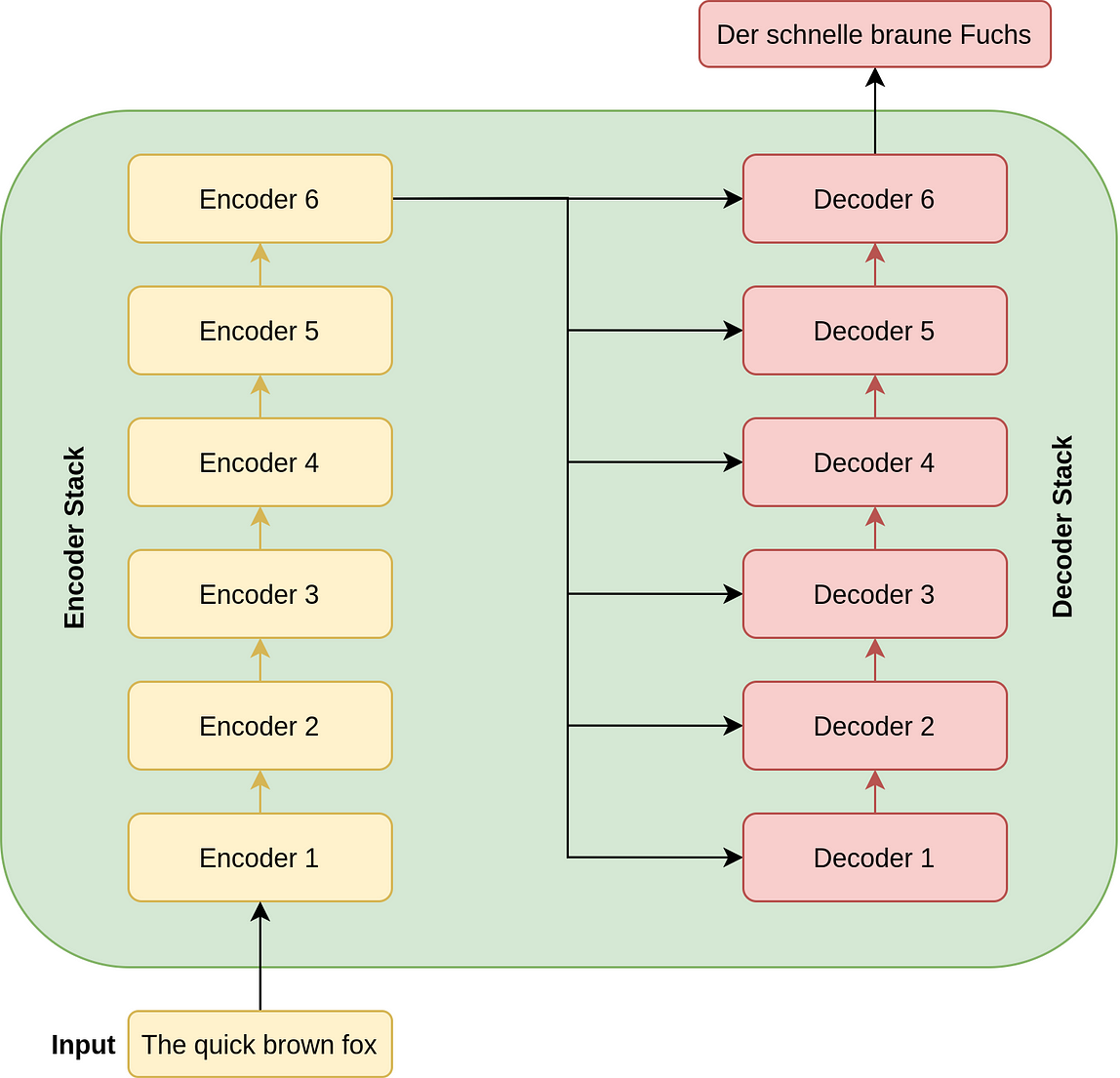
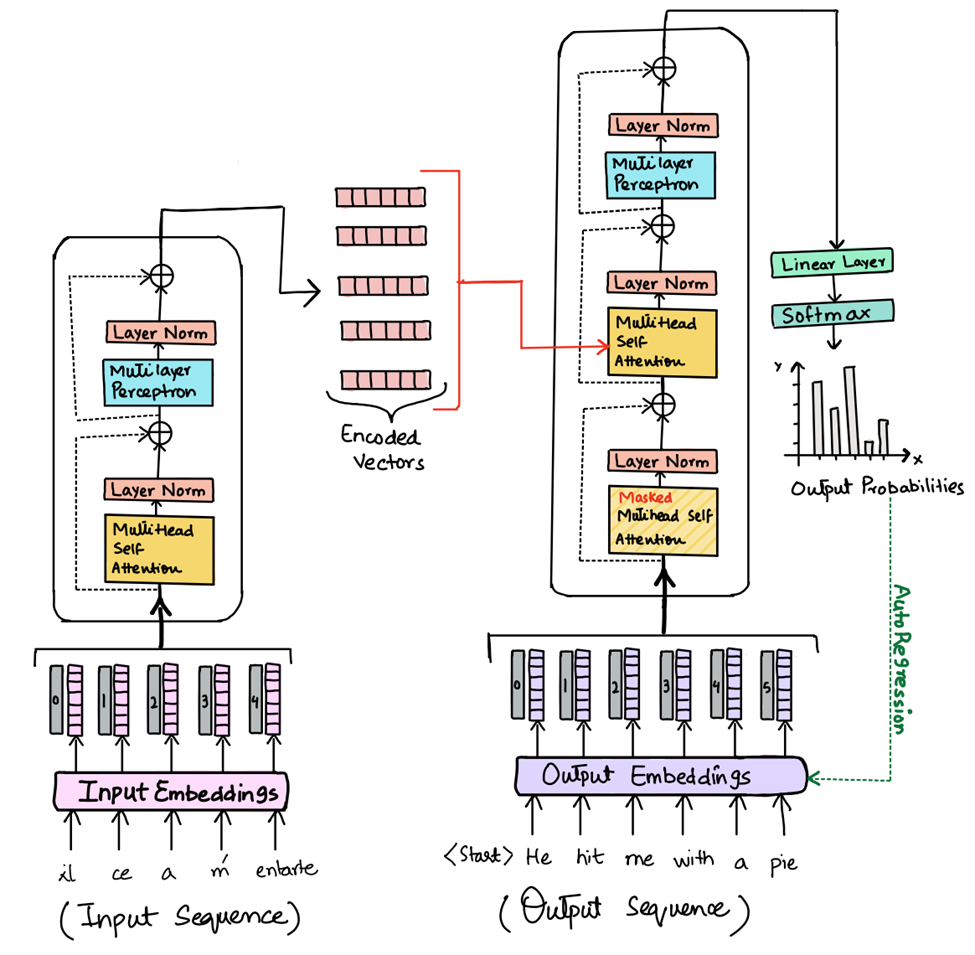
Transformer Architecture
- Parallel Processing: Unlike their recurrent predecessors, transformers process entire sequences simultaneously, which eliminates the sequential computation inherent in RNNs and LSTMs. This characteristic allows for substantial improvements in training efficiency and model scalability.
- Self-Attention: At the heart of the transformer architecture is the self-attention mechanism, which computes the representation of a sequence by relating different positions of a single sequence. This mechanism enables the model to dynamically weigh the importance of each part of the input data, enhancing its ability to capture complex relationships within the data.
- Layered Structure: Transformers are composed of stacked layers of self-attention and position-wise feedforward networks. Each layer in the transformer processes the entire input data in parallel, which contributes to the model's exceptional efficiency and effectiveness.
Attention Mechanism
The attention mechanism allows transformers to consider the entire context of the input sequence, or any subset of it, regardless of the distance between elements in the sequence. This global view is particularly advantageous for tasks that require understanding long-range dependencies, such as document summarization or question-answering.
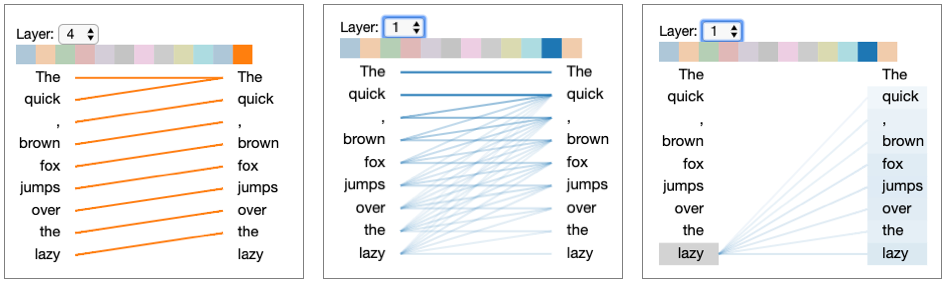
The left and center figures represent different layers / attention heads. The right figure depicts the same layer/head as the center figure, but with the token lazy selected
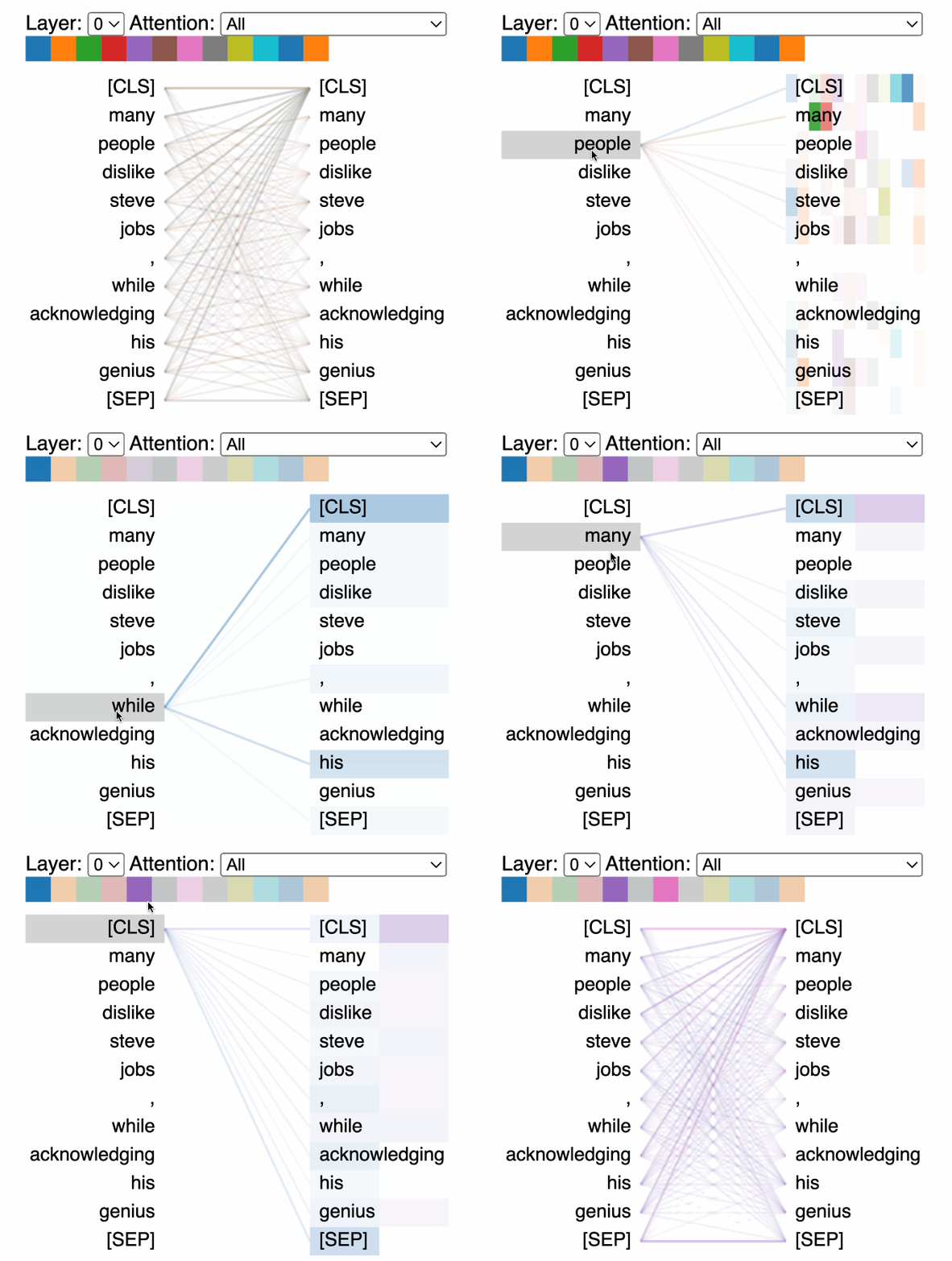
- Scaled Dot-Product Attention: The most commonly used attention mechanism in transformers involves computing the dot product of the query with all keys, dividing each by the square root of the dimension of the keys, applying a softmax function to obtain the weights on the values. This approach efficiently captures the relevance of different parts of the input data to each other.
-
Multi-Head Attention: Transformers further extend the capabilities of the attention mechanism through the use of multi-head attention. This involves running multiple attention operations in parallel, with each "head" focusing on different parts of the input data. This diversity allows the model to attend to different aspects of the data, enhancing its representational power.
Live Demo
DIY GPT nanoGPT
Interlude: Latent Space
The concept of latent space is particularly relevant in the context of autoencoders and generative models within neural network architectures. You can introduce latent space in a subsection under these topics, explaining its significance in learning compact, meaningful representations of data. Here's a suggestion on where and how to incorporate it:
In the realm of autoencoders and generative models, such as Variational Autoencoders (VAEs) and Generative Adversarial Networks (GANs), the concept of latent space plays a central role. Latent space refers to the compressed representation that these models learn, which captures the essential information of the input data in a lower-dimensional form.
- Role in Autoencoders: In autoencoders, the encoder part of the model compresses the input into a latent space representation, and the decoder part attempts to reconstruct the input from this latent representation. The latent space thus acts as a bottleneck, forcing the autoencoder to learn the most salient features of the data.
- Generative Model Applications: In generative models like VAEs and GANs, the latent space representation can be sampled to generate new data points that are similar to the original data. For example, in the case of images, by sampling different points in the latent space, a model can generate new images that share characteristics with the training set but are not identical replicas.
Significance of Latent Space
- Data Compression: Latent space representations allow for efficient data compression, reducing the dimensionality of the data while retaining its critical features. This aspect is particularly useful in tasks that involve high-dimensional data, such as images or complex sensor data.
- Feature Learning: The process of learning a latent space encourages the model to discover and encode meaningful patterns and relationships in the data, often leading to representations that can be useful for other machine learning tasks.
- Interpretability and Exploration: Examining the latent space can provide insights into the data's underlying structure. In some cases, latent space representations can be manipulated to explore variations of the generated data, offering a tool for understanding how different features contribute to the data generation process.
Embeddings
Embeddings are a natural extension of the latent space, particularly in the context of handling high-dimensional categorical data. They transform sparse, discrete input features into a continuous, lower-dimensional space, much like the latent representations in autoencoders and generative models.
Embeddings map high-dimensional data, such as words or categorical variables, to a dense vector space where semantically similar items are positioned closely together. This transformation facilitates the neural network's task of discerning patterns and relationships in the data.
- Application in NLP: In the realm of Natural Language Processing, embeddings like Word2Vec and GloVe have transformed the way text is represented, enabling models to capture and utilize the semantic and syntactic nuances of language. Each word is represented as a vector, encapsulating its meaning based on the context in which it appears.
- Categorical Data Representation: Beyond text, embeddings are instrumental in representing categorical data in tasks beyond NLP. For example, in recommendation systems, embeddings can represent users and items in a shared vector space, capturing preferences and item characteristics that drive personalized recommendations.
Advantages
- Efficiency and Dimensionality Reduction: Embeddings reduce the computational burden on neural networks by condensing high-dimensional data into more manageable forms without sacrificing the richness of the data's semantic and syntactic properties.
- Enhanced Semantic Understanding: By embedding high-dimensional data into a continuous space, neural networks can more easily capture and leverage the inherent similarities and differences within the data, leading to more accurate and nuanced predictions.
- Facilitating Transfer Learning: Similar to latent space representations, embeddings can be employed in a transfer learning context, where knowledge from one domain can enhance performance in related but distinct tasks.
LLMs and the Rise of General-Purpose Models
Recent years have seen the emergence of large language models (LLMs) like GPT-3, BERT, and their successors, which represent a paradigm shift towards training massive, general-purpose models. These models are capable of understanding and generating human-like text and can be adapted to a wide range of tasks, from translation and summarization to question-answering and creative writing.
Addressing Hallucination
There is no general solution to preventing model hallucination. One way I like to think of it is akin to regression: when extrapolating beyond the training data you run the risk of making assumptions that no longer hold.
Approaches include:
- Training Data Curation: Carefully curating and vetting training datasets can reduce the likelihood of hallucination by ensuring that models learn from high-quality, accurate data.
- Prompt and Output Design: In generative models, carefully designing input prompts and setting constraints on outputs can mitigate hallucination effects. This is particularly relevant in NLP applications where the context and phrasing of prompts can significantly influence the model's output.
- Human-in-the-loop: Incorporating human feedback into the training loop can help identify and correct hallucinations, leading to models that better align with factual accuracy and user expectations.
Fine-Tuning
Training an existing transformer-based model on new data is called fine-tuning. It is one possible way to extend its capability.
- Adaptability: Fine-tuning involves taking a model that has been pre-trained on a vast corpus of data and adjusting its parameters slightly to specialize in a more narrow task. This process leverages the broad understanding these models have developed to achieve high performance on specific tasks with relatively minimal additional training.
-
Efficiency: By starting with a pre-trained model, researchers and practitioners can bypass the need for extensive computational resources required to train large models from scratch. Fine-tuning allows for the customization of these powerful models to specific needs while retaining the general knowledge they have already acquired.
-
Fine-tuning a GPT using PyTorch
Step 1: Install Transformers and PyTorch
Ensure you have the **transformers** and **torch** libraries installed. You can install them using pip if you haven't already:
Step 2: Load a Pre-Trained Model and Tokenizer
First, import the necessary modules and load a pre-trained model along with its corresponding tokenizer. We'll use GPT-2 as an example.
from transformers import GPT2Tokenizer, GPT2LMHeadModel

tokenizer = GPT2Tokenizer.from_pretrained('gpt2')
model = GPT2LMHeadModel.from_pretrained('gpt2')
Step 3: Prepare Your Dataset
Prepare your text data for training. This involves tokenizing your text corpus and creating a dataset that the model can process.
texts = ["Your text data", "More text data"]  # Replace with your text corpus
inputs = tokenizer(texts, padding=True, truncation=True, return_tensors="pt")
Step 4: Fine-Tune the Model
Use the Hugging Face **Trainer** class or a custom training loop to fine-tune the model on your dataset. For simplicity, we'll use the **Trainer**.
from transformers import Trainer, TrainingArguments

training_args = TrainingArguments(
    output_dir="./results",           # Output directory
    num_train_epochs=3,               # Total number of training epochs
    per_device_train_batch_size=4,    # Batch size per device during training
    per_device_eval_batch_size=4,     # Batch size for evaluation
    warmup_steps=500,                 # Number of warmup steps for learning rate scheduler
    weight_decay=0.01,                # Strength of weight decay
)

trainer = Trainer(
    model=model,
    args=training_args,
    train_dataset=inputs,  # Assuming `inputs` is your processed dataset
    # eval_dataset=eval_dataset,  # If you have a validation set
)

trainer.train()
Step 5: Save and Use the Fine-Tuned Model
After fine-tuning, save your model for future use and inference.
trainer.save_model("./fine_tuned_model")

# To use the model for generation:
prompt = "Your prompt here"
input_ids = tokenizer.encode(prompt, return_tensors="pt")
generated_text_ids = model.generate(input_ids, max_length=100)
generated_text = tokenizer.decode(generated_text_ids[0], skip_special_tokens=True)

print(generated_text)
Prompt Engineering and One-Shot Learning
Prompt engineering is the art of crafting input prompts that guide the model to generate desired outputs. This technique exploits the model's ability to understand context and generate relevant responses, making it possible to "program" the model for new tasks without explicit retraining.
One-Shot and Few-Shot Learning
One of the most remarkable capabilities of modern LLMs is their ability to perform tasks with minimal examples — sometimes just one or a few (few-shot learning). This ability stems from their extensive pre-training, which provides a rich context for understanding and generating text.
Structured Responses: Why and How
A structured response is output from a language model that follows a specific, machine-readable format—such as JSON, XML, or a table—rather than free-form text.
Why does it matter in health data science?
- Reliability: Structured outputs are easier to validate and less prone to hallucination.
- Interoperability: They can be directly used by other software systems (e.g., EHRs, analytics pipelines).
- Automation: Structured data enables downstream processing, such as automated coding, reporting, or alerting.
- Auditability: It's easier to check for missing or inconsistent information.
How do you get a structured response from an LLM?
- Use schema-based prompting: "Provide your answer in the following JSON format: { ... }"
- Be explicit about required fields and data types.
- Validate the output programmatically.
Example Prompt
Extract the following information from the clinical note and return it as JSON:
{
  "diagnosis": "",
  "confidence": 0.0,
  "reasoning": ""
}
Structured responses are especially important in healthcare, where accuracy, consistency, and the ability to automate downstream tasks are critical. By designing prompts that request structured output, you can make LLMs much more useful and reliable for real-world health data science applications.
LLM API Integration: Building Applications with Language Models
API Access Patterns
- REST APIs: Most LLM providers offer HTTP endpoints that accept JSON payloads containing your prompt and parameters, returning generated text responses
- SDK/Libraries: Client libraries like OpenAI Python, Hugging Face Transformers, and LangChain provide convenient wrappers around the raw APIs
- Authentication: API keys are typically required and should be stored securely as environment variables or in a secrets manager
Common LLM API Providers
OpenAI API
import openai

# Set your API key
openai.api_key = "your-api-key"

# Generate a completion
response = openai.ChatCompletion.create(
    model="gpt-4o",
    messages=[
        {"role": "system", "content": "You are a helpful medical assistant."},
        {"role": "user", "content": "What are the symptoms of diabetes?"}
    ],
    max_tokens=150
)

print(response.choices[0].message.content)
Hugging Face Inference API
import requests

API_URL = "https://api-inference.huggingface.co/models/google/flan-t5-large"
headers = {"Authorization": f"Bearer your-api-key"}

def query(payload):
    response = requests.post(API_URL, headers=headers, json=payload)
    return response.json()

output = query({
    "inputs": "What are the symptoms of diabetes?",
})

print(output)
Function Calling: Enforcing Schema Compliance
Modern LLM APIs (like OpenAI's GPT-4o) support a feature called function calling. This allows you to define a schema (function signature) for the expected output, and the model will return a response that matches this schema—helping to ensure the output is well-structured and reliable.
Why is this useful?
- The model is guided to only return data that fits your specified structure (e.g., required fields, data types).
- Reduces the risk of hallucinated or malformed outputs.
- Makes it easier to integrate LLMs into production systems, especially in healthcare where data quality is critical.
How does it work? You define a function (with parameters and types) and send it to the LLM. The model will return a JSON object that matches the schema, or indicate if it cannot.
Example (OpenAI API):
functions = [
    {
        "name": "extract_diagnosis",
        "parameters": {
            "type": "object",
            "properties": {
                "diagnosis": {"type": "string"},
                "confidence": {"type": "number"},
                "reasoning": {"type": "string"}
            },
            "required": ["diagnosis", "confidence", "reasoning"]
        }
    }
]

response = client.chat.completions.create(
    model="gpt-4o",
    messages=[{"role": "user", "content": "Extract the diagnosis from this note..."}],
    functions=functions,
    function_call={"name": "extract_diagnosis"}
)
Function calling is especially valuable in health data science, where structured, accurate, and validated outputs are essential for downstream analysis, automation, and patient safety.
Error Handling and Best Practices
- Rate limiting: Implement exponential backoff to handle rate limits gracefully
- Timeout handling: Set appropriate timeouts and handle connection issues
- Response validation: Always validate the structure and content of API responses
- Caching: Consider caching responses for identical or similar prompts to reduce costs
- Prompt engineering: Craft clear, specific prompts to get better responses
- Cost management: Monitor token usage and implement budgeting controls
Building a Complete LLM Chat Application
When building applications that interact with LLMs, it's good practice to separate your code into distinct components with clear responsibilities. In this section, we'll explore a complete chat application with two main components:
- LLM Client Library: Handles the low-level API communication, error handling, and conversation formatting
- Command Line Interface: Provides a user interface that leverages the client library
This separation of concerns makes the code more maintainable, testable, and reusable. We'll implement these components in the following order:
1. Implementing a Basic Chat Interface
import requests
import time
import logging

class LLMClient:
    """Client for interacting with LLM APIs"""

    def __init__(
        self,
        model_name="google/flan-t5-base",
        api_key=None,
        max_retries=3,
        timeout=30
    ):
        self.model_name = model_name
        self.api_key = api_key
        self.max_retries = max_retries
        self.timeout = timeout
        self.api_url = f"https://api-inference.huggingface.co/models/{model_name}"
        self.headers = {"Authorization": f"Bearer {self.api_key}"} if self.api_key else {}

    def generate_text(self, prompt):
        """Generate text from the LLM based on the prompt"""
        payload = {"inputs": prompt}

        for attempt in range(self.max_retries):
            try:
                response = requests.post(
                    self.api_url,
                    headers=self.headers,
                    json=payload,
                    timeout=self.timeout
                )

                if response.status_code == 200:
                    return response.json()[0]["generated_text"]
                elif response.status_code == 429:
                    # Rate limit exceeded
                    wait_time = int(response.headers.get("Retry-After", 30))
                    logging.warning(f"Rate limit exceeded. Waiting {wait_time} seconds.")
                    time.sleep(wait_time)
                else:
                    logging.error(f"API request failed with status code {response.status_code}")
                    time.sleep(2 ** attempt)  # Exponential backoff
            except Exception as e:
                logging.error(f"Error during API request: {str(e)}")
                time.sleep(2 ** attempt)  # Exponential backoff

        return "I'm sorry, I couldn't generate a response due to technical difficulties."

    def chat(self, messages):
        """Generate a response based on a conversation history"""
        # Format the conversation history into a prompt
        prompt = ""
        for message in messages:
            role = message["role"]
            content = message["content"]

            if role == "system":
                prompt += f"System: {content}\n\n"
            elif role == "user":
                prompt += f"User: {content}\n\n"
            elif role == "assistant":
                prompt += f"Assistant: {content}\n\n"

        prompt += "Assistant: "

        # Generate response
        response = self.generate_text(prompt)

        return response

# Example usage
client = LLMClient(api_key="your-api-key")
messages = [
    {"role": "system", "content": "You are a helpful healthcare assistant."},
    {"role": "user", "content": "What are the symptoms of diabetes?"}
]
response = client.chat(messages)
print(response)
2. Building a Command Line Interface
Now that we have our LLMClient class from the previous section, we can build a command-line interface that uses it. This CLI will:
- Parse command-line arguments for model selection and API key
- Initialize the LLMClient with the appropriate settings
- Maintain a conversation history
- Handle the interactive chat loop
import argparse
import os
from llm_client import LLMClient

def main():
    parser = argparse.ArgumentParser(description="Chat with an LLM")
    parser.add_argument("--model", default="google/flan-t5-base", help="Model to use")
    parser.add_argument("--api-key", help="API key (or set HUGGINGFACE_API_KEY env var)")
    args = parser.parse_args()

    # Get API key from args or environment
    api_key = args.api_key or os.environ.get("HUGGINGFACE_API_KEY")
    if not api_key:
        print("Error: API key required. Provide with --api-key or set HUGGINGFACE_API_KEY")
        return

    # Initialize client
    client = LLMClient(model_name=args.model, api_key=api_key)

    # Initialize conversation
    conversation = [
        {"role": "system", "content": "You are a helpful assistant."}
    ]

    print(f"Chat with {args.model} (type 'exit' to quit)")
    print("-" * 50)

    while True:
        user_input = input("You: ")
        if user_input.lower() == "exit":
            break

        # Add user message to conversation
        conversation.append({"role": "user", "content": user_input})

        # Get response
        response = client.chat(conversation)

        # Add assistant response to conversation
        conversation.append({"role": "assistant", "content": response})

        print(f"Assistant: {response}")

if __name__ == "__main__":
    main()
Benefits of This Architecture
This two-component architecture demonstrates several important software engineering principles:
- Separation of concerns: The LLMClient handles API communication and error handling, while the CLI handles user interaction and command-line arguments
- Reusability: The LLMClient can be used in other applications beyond this CLI (web apps, APIs, etc.)
- Maintainability: Changes to the API interaction logic only need to be made in one place
- Testability: Each component can be tested independently
- Flexibility: The CLI can be easily modified to support different models or parameters without changing the core client logic
This pattern is common in professional software development and is especially useful when building applications that interact with external APIs.
Live Demo
Zero-, One-, and Few-Shot Learning
Links
- Attention Paper - https://arxiv.org/abs/1409.0473
- Visual introduction to Attention - https://erdem.pl/2021/05/introduction-to-attention-mechanism
- Transformers
- "Attention is all you need" paper https://arxiv.org/abs/1706.03762
- The Illustrated Transformer https://jalammar.github.io/illustrated-transformer/
- Building Transformers from Scratch
- Transformer Explainer
- Multi head attention - https://towardsdatascience.com/transformers-explained-visually-part-3-multi-head-attention-deep-dive-1c1ff1024853
- DIY nanoGPT from scratch - https://github.com/karpathy/nanoGPT/blob/master/train.py
- Karpathy's Neural Networks: Zero to Hero - https://karpathy.ai/zero-to-hero.html
- Let's build GPT: from scratch, in code, spelled out https://www.youtube.com/watch?v=kCc8FmEb1nY
- Visualize GPT-2 using WebGL
- Reinforcement Learning with Human Feedback - https://arxiv.org/abs/2203.02155
LLMS
List of open source LLMS
- ChatGPT or Grok? Gemini or Claude?: Which AIs do which tasks best, explained.
- https://github.com/eugeneyan/open-llms
- GPT (2018) https://s3-us-west-2.amazonaws.com/openai-assets/research-covers/language-unsupervised/language_understanding_paper.pdf
Knowledge Distillation
- DistilBERT, a distilled version of BERT: smaller, faster, cheaper and lighter https://arxiv.org/pdf/1910.01108v4.pdf
Health CARE & AI
- UCSF Versa! https://ai.ucsf.edu/platforms-tools-and-resources/ucsf-versa
- https://thymia.ai/su
- https://www.suki.ai/
- https://www.riken.jp/en/research/labs/bdr/
- https://sites.research.google/med-palm/
Where to play around